
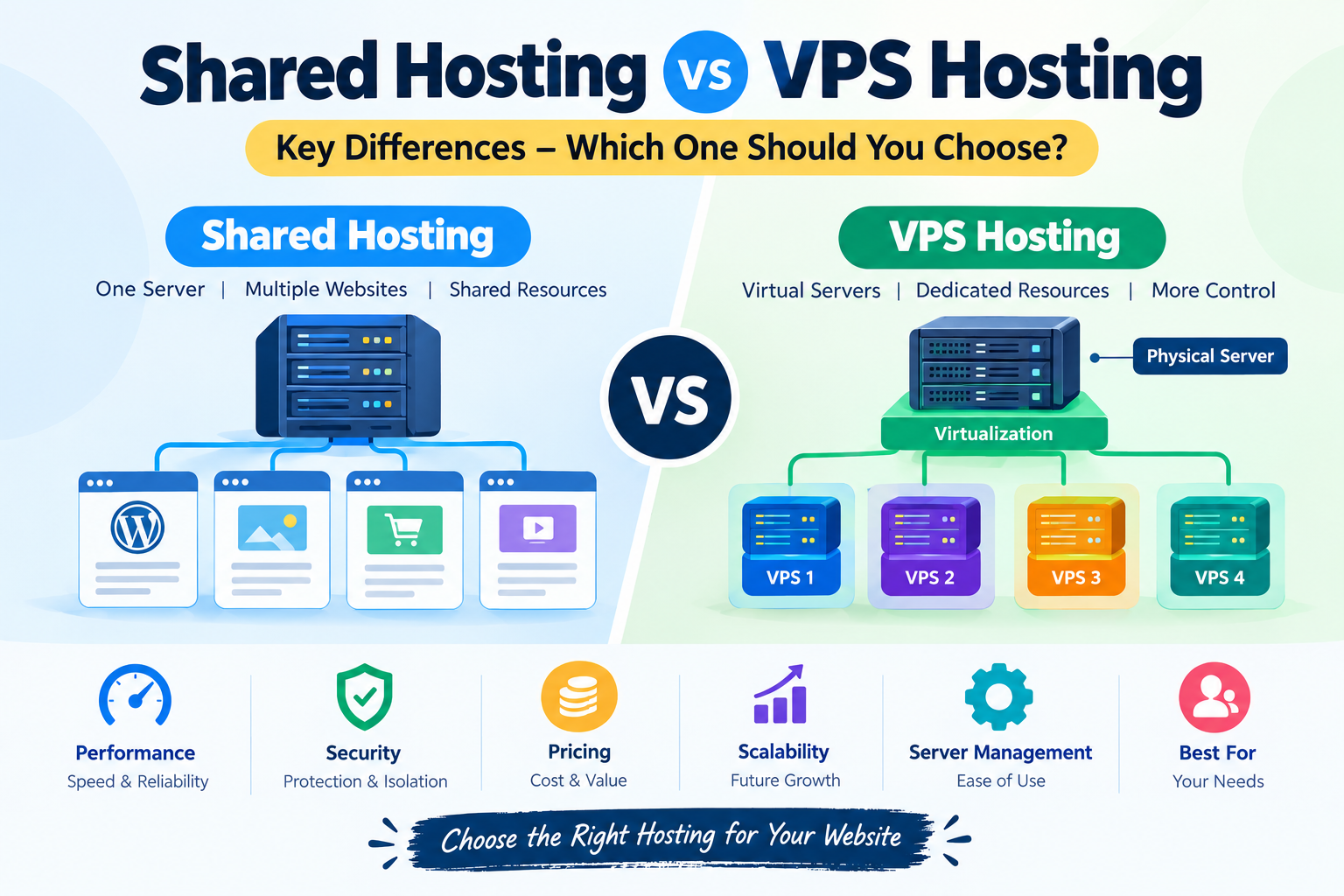
Choosing the right web hosting service is one of the most important decisions when creating a website. Your hosting environment affects website performance, loading speed, security, scalability, and overall user experience. Two popular hosting options are shared hosting and VPS hosting.
But what is the difference between shared hosting vs VPS hosting? Which option is suitable for beginners, bloggers, business owners, and growing websites?
Both hosting solutions have their own advantages and limitations. Shared hosting is generally designed for smaller websites and beginners, while VPS hosting provides more dedicated resources, flexibility, and control.
In this guide, we will explain the key differences between shared hosting and VPS hosting, including their features, performance, security, costs, advantages, and disadvantages. By the end, you will have a better understanding of which hosting solution fits your website requirements.
What Is Shared Hosting?
Shared hosting is a web hosting service in which multiple websites use resources from the same physical server.
In this environment, different website owners share server resources such as CPU, RAM, storage, and network capacity. The hosting company manages the server infrastructure, maintenance, and most technical configurations.
Shared hosting is popular among beginners because it is relatively affordable and does not require advanced server management knowledge.
For example, if you are starting a personal blog, portfolio, small business website, or basic WordPress website, shared hosting can be a practical starting point.
How Does Shared Hosting Work?
Imagine an apartment building where several families live in separate apartments but share certain facilities.
Shared hosting works in a similar way. Multiple websites operate on one physical server and share its available resources.
Each website has its own files and account, but the server resources are distributed among the hosted accounts.
The hosting provider usually handles:
- Server maintenance and updates.
- Basic server security.
- Hosting control panel access.
- Website storage and database management.
- Technical infrastructure.
- Basic backup options, depending on the plan.
Advantages of Shared Hosting
1. Affordable Starting Cost
Shared hosting is generally one of the most economical hosting options. Since multiple customers share server expenses, hosting providers can offer relatively low-cost plans.
2. Beginner-Friendly Management
Most shared hosting services provide easy-to-use control panels and one-click application installers. You can install WordPress without manually configuring a server.
3. No Advanced Server Knowledge Required
The hosting company manages the server environment, making it suitable for people who do not have technical experience.
4. Simple Website Management
You can manage domains, email accounts, databases, files, and website applications through a hosting dashboard.
5. Suitable for Small Websites
Personal blogs, small business websites, portfolios, and informational websites can often operate comfortably on shared hosting.
Disadvantages of Shared Hosting
Despite its affordability, shared hosting has some limitations.
- Resources are shared with other websites.
- Performance can be affected by heavy resource usage on the server.
- Server configuration options are limited.
- Root access is generally unavailable.
- Some advanced applications may not be supported.
- Scaling can become difficult when website resource requirements increase.
What Is VPS Hosting?
VPS stands for Virtual Private Server. It is a hosting solution that uses virtualization technology to divide a physical server into multiple virtual server environments.
Each VPS operates with its own allocated resources and operating system environment.
Unlike traditional shared hosting, VPS hosting provides a more isolated environment and greater control over server configurations.
It is suitable for growing websites, online businesses, developers, web applications, and projects that require more server resources.
How Does VPS Hosting Work?
A physical server is divided into several virtual machines using virtualization technology.
Each virtual machine operates independently with allocated CPU, RAM, and storage resources.
For example, a physical server may host several VPS environments. Each customer manages their own virtual server without directly managing other customers’ virtual machines.
VPS hosting generally provides:
- Allocated server resources.
- Greater server configuration flexibility.
- Root or administrator access, depending on the service.
- Independent software installation.
- More control over security settings.
- Better options for scaling resources.
Advantages of VPS Hosting
1. More Dedicated Resources
VPS hosting provides allocated resources, helping your website maintain more predictable performance compared with a typical shared hosting environment.
2. Greater Control
You can configure server settings, install supported applications, and customize the environment according to your requirements.
3. Better Isolation
Your virtual server operates in an isolated environment. Other VPS customers generally cannot directly access your server files or configurations.
4. Flexible Scalability
You can often upgrade CPU, RAM, and storage as your website grows, depending on your provider and hosting plan.
5. Suitable for Growing Projects
VPS hosting can support websites, applications, databases, and other projects with higher resource requirements.
Disadvantages of VPS Hosting
VPS hosting also comes with certain challenges.
- It generally costs more than shared hosting.
- Technical knowledge may be required.
- Server configuration can be complicated for beginners.
- Security updates and maintenance may be your responsibility with unmanaged VPS plans.
- Poor server management can affect website performance and security.
- Some managed VPS services cost considerably more than unmanaged options.
Shared Hosting vs VPS Hosting: Key Differences
The main difference between shared hosting and VPS hosting is how server resources are allocated and managed.
Here is a quick comparison:
| Feature | Shared Hosting | VPS Hosting |
|---|---|---|
| Server Environment | Shared server | Virtual server |
| Resources | Shared | Allocated resources |
| Performance | Depends on server usage | More predictable |
| Security Isolation | Account-level isolation varies | Stronger virtual isolation |
| Root Access | Generally unavailable | Usually available |
| Customization | Limited | Greater flexibility |
| Scalability | Plan-dependent | Generally more flexible |
| Management | Provider-managed | Managed or self-managed |
| Technical Skills | Beginner-friendly | Intermediate to advanced |
| Cost | Usually lower | Usually higher |
| Best For | Small websites | Growing websites and applications |
Actual features depend on the hosting provider and the selected plan.
1. Performance and Website Speed
Website performance is an important factor when choosing a hosting service.
In shared hosting, multiple websites use resources from the same physical server. If some websites consume significant resources, other websites on that server may experience performance variations.
VPS hosting provides allocated resources, which can make performance more predictable.
However, VPS hosting does not automatically guarantee faster loading speeds. Website optimization, server hardware, network quality, caching, and application configuration also influence performance.
Which is better?
VPS hosting generally offers more control over performance and resource allocation. Shared hosting can still provide sufficient performance for smaller websites.
2. Security and Website Protection
Security is another important difference between these hosting options.
With shared hosting, multiple customer accounts operate on the same physical server. Hosting providers use account isolation and other security measures to protect individual websites.
VPS hosting offers a more isolated virtual environment. This gives website owners greater control over firewall configurations, software installations, and server security.
However, VPS security also depends on proper configuration and maintenance.
For example, unmanaged VPS users may need to handle:
- Operating system updates.
- Firewall configuration.
- SSH access protection.
- Software updates.
- Security monitoring.
- Backup management.
Which is better?
VPS hosting offers greater security customization and isolation, but both hosting types require proper security practices.
3. Pricing and Overall Cost
Cost is one of the main reasons beginners choose shared hosting.
Since server expenses are distributed among multiple customers, shared hosting is generally available at a lower starting price.
VPS hosting costs more because customers receive an individual virtual server environment with allocated resources.
The total cost of VPS hosting may also include additional expenses such as server management, backups, monitoring, and technical support.
Before selecting a plan, compare introductory pricing with renewal pricing. Also check whether important features are included or charged separately.
Which is better?
Shared hosting is generally better for people with limited budgets. VPS hosting may provide better value for websites that need additional resources and server control.
4. Scalability and Resource Management
Scalability refers to the ability to increase hosting resources when your website grows.
Shared hosting plans usually provide fixed resource limits. When your website starts receiving more visitors, you may need to upgrade to a higher plan or migrate to another hosting environment.
VPS hosting usually provides more flexible resource management.
Depending on the provider, you may be able to increase:
- CPU resources.
- RAM capacity.
- Storage space.
- Bandwidth allowances.
- Server configurations.
Which is better?
VPS hosting is generally more suitable for growing websites that need greater control over resource allocation.
5. Server Management and Technical Knowledge
Shared hosting is designed to make website management easier.
The hosting company handles most server-related responsibilities. Users can manage their websites through a graphical control panel.
VPS hosting provides greater flexibility but may require technical knowledge.
For unmanaged VPS hosting, you may need to understand Linux commands, server administration, software installation, firewall settings, and troubleshooting.
Managed VPS hosting is another option for users who want additional server control without handling every technical responsibility themselves.
Which is better?
Shared hosting is more suitable for beginners. Managed VPS hosting can be a practical option for users who want additional resources without managing the entire server themselves.
6. Who Should Choose Shared Hosting?
Shared hosting is a sensible option for websites with modest resource requirements.
Consider shared hosting if you:
- Are starting your first WordPress blog.
- Want to create a personal website.
- Run a small business website.
- Manage a portfolio or informational website.
- Have a limited hosting budget.
- Prefer a simple hosting dashboard.
- Do not want to manage server configurations.
For many new website owners, starting with shared hosting and upgrading later is a reasonable approach.
7. Who Should Choose VPS Hosting?
VPS hosting may be more appropriate when your website requires additional resources or server customization.
Consider VPS hosting if you:
- Manage a growing content website.
- Run an online store with increasing traffic.
- Need custom server configurations.
- Develop web applications.
- Operate resource-intensive software.
- Need administrator or root access.
- Want greater control over your hosting environment.
VPS hosting is particularly useful for developers and businesses that need more flexibility than standard shared hosting provides.
Popular Shared Hosting and VPS Hosting Providers
Several hosting companies offer both shared hosting and VPS hosting solutions.
Here are some providers worth comparing:
1. Hostinger
Hostinger provides website hosting solutions, including shared hosting and VPS hosting.
Its hosting services include website management tools, WordPress support, and different hosting configurations.
Official website: https://www.hostinger.com/
2. Bluehost
Bluehost offers hosting solutions for WordPress websites, businesses, and other online projects.
It is worth comparing its available hosting plans, resource limits, and support options before purchasing.
Official website: https://www.bluehost.com/
3. SiteGround
SiteGround provides managed website hosting services with performance, security, and website management features.
It is commonly considered by WordPress website owners looking for managed hosting environments.
Official website: https://www.siteground.com/
4. DreamHost
DreamHost offers different hosting solutions, including shared hosting and VPS hosting.
It also provides WordPress-related hosting services and website management tools.
Official website: https://www.dreamhost.com/
5. HostGator
HostGator provides hosting options for personal websites, blogs, and business projects.
Its hosting services include different plans depending on website requirements.
Official website: https://www.hostgator.com/
Always review current plan specifications, renewal rates, resource limits, and support policies before selecting a provider.
Can You Upgrade from Shared Hosting to VPS Hosting?
Yes. Many website owners begin with shared hosting and later move to VPS hosting when their requirements increase.
For example, imagine you launch a WordPress blog with a few articles and a small number of visitors.
Initially, shared hosting may provide everything you need.
Over time, your website might grow and start receiving more visitors. You may also install additional applications or run resource-intensive plugins.
At this stage, upgrading to VPS hosting could provide more resources and configuration flexibility.
A typical migration process includes:
- Select a suitable VPS hosting plan.
- Configure the new server environment.
- Transfer website files and databases.
- Test the website on the new server.
- Update DNS settings.
- Verify SSL certificates and website functionality.
- Monitor performance after migration.
You can also ask your hosting provider whether it offers migration assistance.
Frequently Asked Questions (FAQs)
1. Is shared hosting better than VPS hosting?
Neither option is universally better. Shared hosting is generally suitable for beginners and smaller websites, while VPS hosting offers more resources, flexibility, and control.
2. Is VPS hosting faster than shared hosting?
VPS hosting can provide more predictable performance because resources are allocated to individual virtual servers. However, actual speed depends on hardware, configuration, optimization, and network quality.
3. Can I host WordPress on shared hosting?
Yes. Most shared hosting providers support WordPress installation. It is a common choice for personal blogs and smaller content websites.
4. Does VPS hosting require coding knowledge?
Not necessarily. However, unmanaged VPS hosting requires server administration knowledge. Managed VPS hosting can reduce the technical responsibilities.
5. Is VPS hosting more secure than shared hosting?
VPS hosting generally provides stronger virtual isolation and greater control over security configurations. However, security depends on server management, software updates, and proper configuration.
6. When should I upgrade from shared hosting to VPS hosting?
Consider upgrading when your website regularly reaches resource limits, experiences performance issues that cannot be resolved through optimization, or requires custom server configurations.
7. Can multiple websites run on a VPS?
Yes. You can host multiple websites on a VPS, provided that the available resources, software configuration, and hosting provider’s terms support your requirements.
8. Is managed VPS hosting worth considering?
Managed VPS hosting can be useful if you want VPS resources and flexibility but prefer the hosting provider to handle important server administration tasks.
Final Verdict: Shared Hosting or VPS Hosting?
The choice between shared hosting and VPS hosting depends on your website’s size, traffic, technical requirements, and budget.
Shared hosting is a practical starting point for beginners, bloggers, and small business owners. It provides an affordable way to launch a website without managing complex server configurations.
VPS hosting is more suitable for growing projects that need allocated resources, additional control, and flexible server configurations.
If you are launching your first WordPress blog, shared hosting is often enough. As your website develops and its requirements increase, you can consider upgrading to VPS hosting.
The most important thing is to select a hosting solution that matches your current needs while allowing room for future growth.
